Preconfiguration Explained: How One Checklist Gets Every AI Coding Agent's Machine Ready Before It Starts
Preconfiguration is a prototype of a small program called preconfig. It gets a computer ready for an AI coding agent before the agent starts, from one short checklist, for every agent a team uses. Then it proves the computer is ready by running the project’s own tests on it.
That matters because of how coding agents work today. Tools like GitHub Copilot’s cloud agent and Cursor’s cloud agents take a task and do it on a fresh computer in the cloud. That computer starts empty. If nobody has told it what the project needs, the agent has to guess, and it often guesses wrong: it installs the wrong version, can’t start the database, or gives up on the tests and hands back code nobody checked.
Each agent company wants the checklist written its own way, in its own file. A team with three agents writes the same checklist three times, and the copies drift apart. preconfig lets the team write it once.
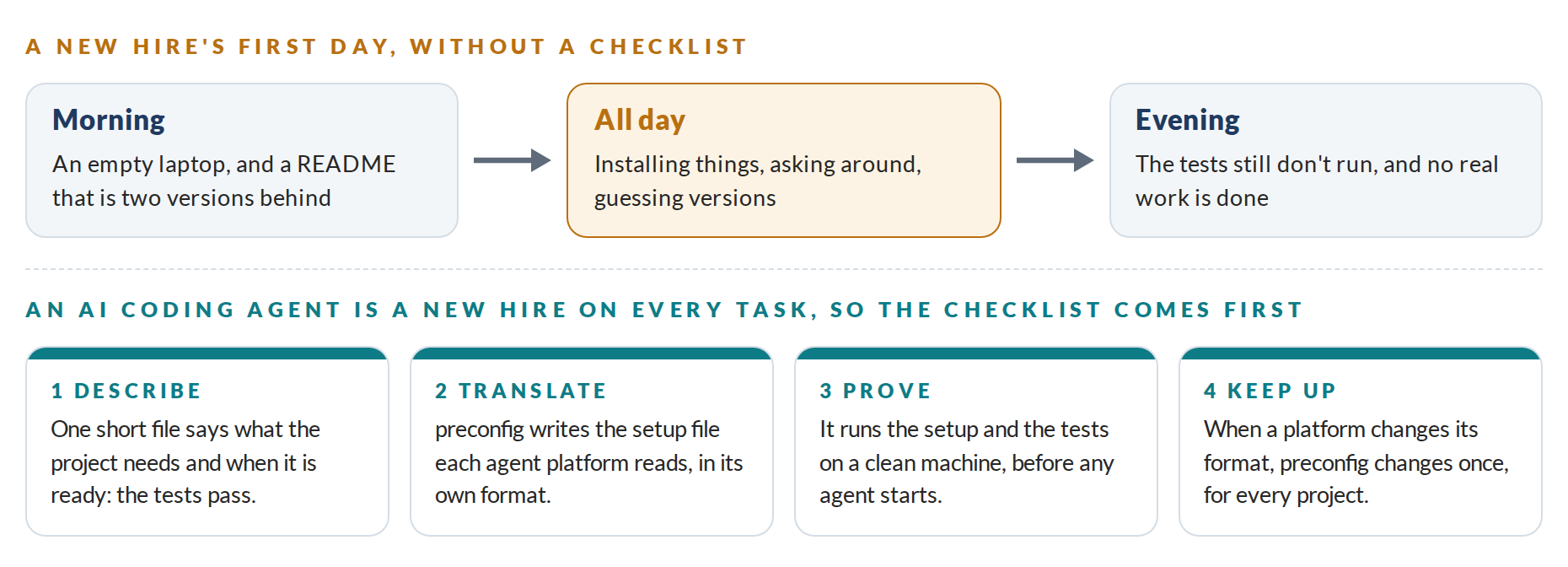
A New Hire on Every Task
The easiest way to picture it is a new hire’s first day.
If nobody has set up the laptop, the new person loses the day installing things, or does the job badly. GitHub describes agent setup the same way, as onboarding a new teammate. An AI agent is a new hire on every task, many times a day. And each agent company wants the checklist on its own form.
preconfig works in four steps:
- Describe. The team writes one short file,
preconfig.yaml: this project needs Python 3.12, a PostgreSQL database and Redis, runspip install, and is ready when its tests pass. - Translate. preconfig writes the setup file each tool expects: Copilot’s workflow, Cursor’s environment, a dev container, a script for a new server.
- Prove. It runs the whole setup on a clean computer, then the tests, and says which step broke if one did.
- Keep up. When an agent company changes its format, preconfig changes once, and every project picks it up the next time it builds.
It can also write the first draft of the checklist itself, by reading the files a project already has: the Python version file, the list of packages, the database settings the developers use.
One Run, Step by Step
The live demo shows the whole idea with a small sample service that keeps orders in PostgreSQL and counts in Redis:
preconfig detect --write   # draft preconfig.yaml from the project's files
preconfig build            # write the setup file each agent platform reads
preconfig check            # look for mistakes in the setup files
preconfig verify           # set up a clean computer and run the tests
detect reads five of the project’s files and drafts the checklist, noting where each line came from. build writes seven files for five platforms. check looks over the setup files, and on a set written by hand it finds 15 errors, like a Copilot job with the wrong name, which would stop Copilot’s next session with an error. verify sets up an empty Ubuntu computer and runs the tests: READY in 49.6 seconds in the recorded run. With Redis left out of the checklist, verify stops at the tests instead and shows the error, before any agent runs into it.
What Has Been Built So Far
The Alpha, the first working version, runs on Linux, and the program itself also builds for macOS and Windows. Tested on one Linux machine:
- preconfig is a single program of about 3.3 MB, built only on Go’s standard library.
- It writes setup files for five platforms, and each one passes that platform’s published format checks.
- On a clean computer, the sample service went from nothing to passing tests, with its databases running, in about a minute.
- 32 bugs were planted in the engine on purpose, to check that the tests would notice them. The tests caught all 32.
The demo’s service and its hand-written setup files are samples written for the demo. The program is real, and every line in the demo is what it printed.
What It Doesn’t Do Yet
preconfig is still a prototype. The files it writes have been checked against each platform’s rules, but Copilot, Cursor and Codespaces haven’t run them yet. It knows Node.js, Python and Go, PostgreSQL and Redis, and not yet Java, Ruby or MySQL. Some ways of installing, such as Node.js and Go, couldn’t be tested on the test machine’s network. And it only prepares the computer: it doesn’t tell the agent how to behave, and it doesn’t watch what the agent does.
What Comes Next
The next phase, the Beta, is planned at about 12 weeks with two people. It runs every file on the platform that reads it, with 20 real projects each, adds Java, Ruby, Rust and MySQL, and checks every change to a project’s setup automatically. Its main test is teams’ own agents working for four weeks on computers set up by preconfig, counting how often a session failed because of the setup.
After a first full release, the plan is to sell what companies with many projects need on top: one view of every project’s agent setup, alerts when a setup drifts, rules on what agent computers may install, and computers prepared in advance so sessions start in seconds. The basic tool stays complete on its own.
You can watch the recorded demo and try your own checklist in a browser at preconfiguration.com/demo. There’s nothing to install.