About
Preconfiguration.com is a project at an early stage. Its engine works: it compiles one spec into the setup files of five platforms, checks the files a repository already has, and proves a setup on a clean machine. When a setup fails, its second engine, Preconfig Doctor, reads the log, names the cause and, when the cause is in the spec, writes the fix there. Two live demos replay them and run the engine in your browser. The next step is real agents doing real work on the platforms themselves. This site shows where the project stands, gaps included.
Why the Project Exists
AI coding agents now take a task, work on their own and hand back a pull request. Most of them start each task on a fresh machine in the cloud: GitHub Copilot’s cloud agent on a GitHub Actions runner, Cursor’s cloud agents in their own containers, others in dev containers or virtual machines. Whatever the project needs, the right Python, a database, the packages, has to be installed before the agent can build or test anything.
When that machine isn’t ready, the agent guesses. It installs by trial and error, skips the tests it can’t run or hands back code that was never tested. The vendors say so themselves: GitHub warns that an agent left to find and install dependencies by trial and error is slow and unreliable, and Cursor calls environment setup the most important step for getting good work from its cloud agents.
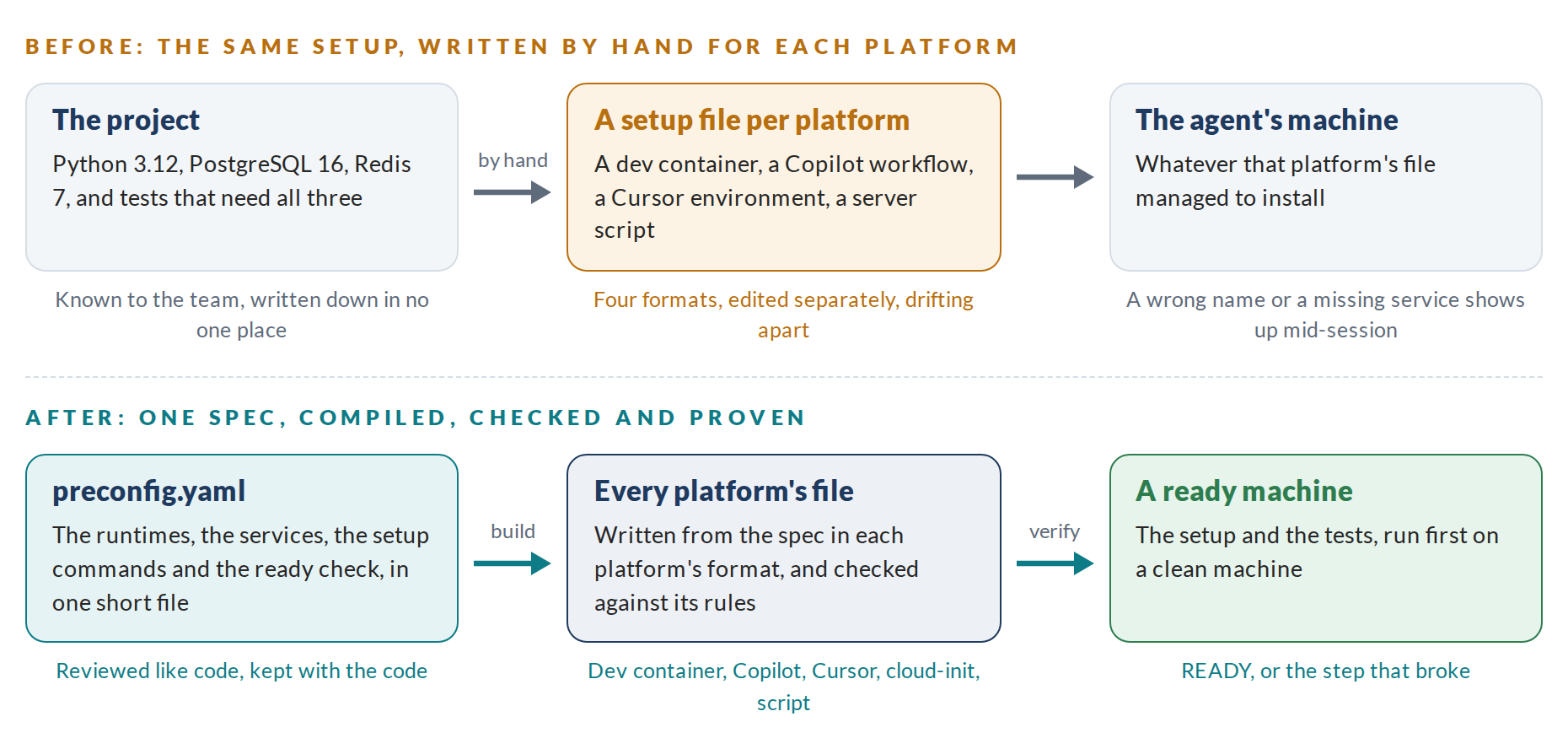
Each platform wants the setup in its own file and format, and most teams use more than one agent. So the same setup gets written three or four times by hand, drifts apart, and breaks where nobody is watching: a job with the wrong name that stops an agent session, a key the platform doesn’t accept, a service nobody starts.
What the Project Is Building
- One spec. A short
preconfig.yaml: the runtimes, the packages, the services, the environment, the setup commands and the ready check. How it works - A compiler.
preconfig buildwrites the file each platform reads: a dev container, GitHub Copilot’s setup workflow, Cursor’s environment, cloud-init and a plain setup script. - A checker.
preconfig checkreads the setup files a repository already has and reports what each platform would reject or ignore, and what has drifted from the spec. - A proof.
preconfig verifyruns the setup and the ready check on a clean machine and names the step that broke. - A doctor.
preconfig doctorreads the log of a setup that failed, names the cause, and writes the fix into the spec when that’s where the cause lies. Preconfig Doctor - Later, the team layer. One view of every repository’s agent setup, drift alerts, a diagnosis for every failed setup, rules on what agent machines may install, hosted checks and prebuilt machines: the parts companies would pay for. The roadmap
How the Project Works
- Measure, then say it. Every figure about the engines was measured on the Alphas of Preconfig Core and Preconfig Doctor, or is marked as an estimate. Market figures link to their sources, and computed ones say so. The scripts that reproduce each number are kept with the source.
- Say what is simulated. The demo’s repositories are samples written for it, and no coding agent ran for this site. The engine is real, and so is every line it printed.
- Plain files, nothing running. Preconfiguration writes the files each platform already reads and then gets out of the way. Nothing of it runs while the agent works.
- Dated knowledge. The platform facts that change most live in one place in the engine, with the date it was last checked against the platforms: September 29, 2026 for the Alpha, and November 4, 2026 for preconfig 0.2 and 0.3. Since 0.3, check warns when that date is more than 60 days old, so a team knows to update. Doctor’s knowledge of which Ubuntu package holds what is dated September 30. When a platform changes its format, the engine changes once.
- Small by default. One binary, no daemon, no account, and no dependencies beyond Go’s standard library.
License and Availability
Preconfiguration is open source under the Apache License 2.0. The code, its tests, the recorded results, the demos’ source and ready-built binaries for Linux, macOS and Windows are on GitHub: github.com/Preconfiguration/preconfig.
Copyright Preconfiguration.com 2026
Questions People Ask
Can I Download the Engine?
Yes. The source and ready-built binaries for Linux, macOS and Windows are on GitHub, under the Apache License 2.0. The latest release, each archive with the preconfig command and its license files:
- Linux: x86-64 · Arm
- macOS: Apple silicon · Intel
- Windows: x86-64
- Checksums: SHA256SUMS
Before a release goes out, each binary is run on its own system: it drafts, builds and checks a sample repository, and Doctor reads a failed setup’s log and fixes its spec. The macOS binaries aren’t signed by Apple, so macOS may ask you to allow them the first time. The live demo replays real runs of the Alpha and runs the engine in your browser.
Is the Demo Real?
The engine is real. Every line in the demo’s terminal is what the Alpha printed on the sample repositories, and the two verify runs were recorded on a clean Ubuntu 24.04 container. The files and findings in its two panels come from the Alpha’s own Go code, compiled for the browser. The repositories are samples written for the demo, and no coding agent ran in it.
Which Agents Does It Support?
Any agent that reads one of its nine targets. GitHub Copilot’s cloud agent reads .github/workflows/copilot-setup-steps.yml. Cursor’s cloud agents read .cursor/environment.json. Tools built on the dev container standard, such as GitHub Codespaces and VS Code, read .devcontainer/devcontainer.json, and so does Ona, which reads its tasks from .ona/config.yaml. Devin builds its machine from .devin/blueprint.yaml. Claude Code’s cloud sessions run a setup hook from .claude/settings.json. OpenAI Codex keeps setup in its own settings, so preconfig writes what to enter there. A fresh virtual machine reads cloud-init.yaml, and anything that takes a shell script can run .preconfig/setup.sh. So far only Claude Code has run preconfig’s setup on its own platform; the 0.2 post says what is proven and what isn’t.
Does It Replace AGENTS.md or Rules Files?
No. Those tell an agent how to behave: the conventions, the commands, what not to touch. Preconfiguration handles the machine the agent works on: what is installed, what is running, and whether the tests can pass there. The two sit side by side.
Does It Put Secrets in the Files?
No. preconfig.yaml lists secrets by name only, and a spec is refused when a variable whose name looks like a secret, such as NPM_TOKEN, has its value written in it. Copilot, Cursor and the dev container read them from their platforms’ own secret settings; cloud-init and the setup script take them from the environment they run in. preconfig build says where to set each one.
What Does Doctor Need?
The log, and the spec if there is one: Doctor needs it to write a fix, and uses it to fill in values and to tell a secret from a missing variable. It reads the output of preconfig verify, the log verify writes with --log, a Docker build, a GitHub Actions job or cloud-init’s log, on the machine it runs on. There’s no model and no service, so a log never leaves that machine. When no rule fits, Doctor says it doesn’t know and changes nothing.
What Does Verify Need?
Docker, and network access to the package sources the setup uses. It copies the repository into a fresh container read-only, runs the generated setup script and the ready check, and reports each step with its time. Nothing on the machine running verify is changed.
Does It Work on macOS or Windows?
The engine compiles for Linux, macOS and Windows, but so far it has run on Linux x86-64 only, verify included. build, check and detect only read and write text files, and verify needs Docker. The generated setups target Ubuntu 24.04, the base of the platforms’ own machines.
Is It Open Source?
Yes. The engine and the preconfig.yaml format it reads are open source under the Apache License 2.0, on GitHub.
Get in Touch
Teams running coding agents, platform teams who look after many repositories, and anyone with a question, a stack or a failed setup log the project should test are welcome to write.